
 Book a Demo
 Platform Guidance
Last updated: May 12, 2026
ElectHQ is a comprehensive campaign management platform built to support every stage of the election cycle — from candidacy setup to post-election analytics. This Platform Guidance document is your reference for using ElectHQ effectively, responsibly, and in compliance with all applicable requirements.
Please read this guide carefully before using the platform. By accessing or using the Services, you agree to operate within the guidelines set out here. For legal terms governing your use of the platform, refer to our Terms of Service.
To close your account and delete your data, start on our Account Deletion request page (identity verification is required). More detail is in the Account Deletion section below.
Getting Started
Getting Started
To begin using ElectHQ, create an account at ElectHQ.net and complete the onboarding process. You will be guided through setting up your campaign profile, connecting your team, and configuring your initial preferences.
System Requirements
ElectHQ is a cloud-based platform accessible via any modern web browser. We recommend using the latest version of Google Chrome, Mozilla Firefox, Microsoft Edge, or Safari for the best experience. No software installation is required for the web platform.
Account Creation
When registering, you will be asked to provide your full name, email address, phone number, and payment information. Ensure the information you provide is accurate — it is used to verify your identity, process your subscription, and configure your account settings.
Free Trial
New accounts are eligible for a free trial period. During the trial, you may access the core features of ElectHQ together with your voter data at no charge. Any data entered or customizations made during the trial period will be permanently lost if you do not purchase a subscription before the trial ends. Please note that add-on services, including SMS/MMS text messaging and email communications, are not included in the free trial and will be charged on a pay-as-you-go basis from the moment they are activated.
Campaign Setup
Your Voter Data
Once your account is created, you will be asked several questions regarding your campaign, including:
• The office you are running for
• Your campaign website
• Your campaign manager's information
• Your campaign address
Once this information is provided, your full voter data will be uploaded to your account. Our team will contact you if the information you provided is not sufficient for us to determine your voters data. You will receive an email from us once your voters data has been fully uploaded and is ready for use.
Volunteer Management
Volunteer Management
The Volunteer Management module provides a complete toolkit for recruiting, onboarding, and engaging your campaign volunteers.
Volunteer Onboarding
Volunteers can be manually added or joined by registering through the E-Volunteer mobile app (available on iOS and Android). Please see Section 4 below for more information on volunteer onboarding.
Task Assignment & Scheduling
Assign turfs or tasks to volunteers or group of volunteers, set deadlines, and monitor completion status in real time.
E-Volunteer App
E-Volunteer App
The E-Volunteer App is ElectHQ's dedicated mobile application for campaign volunteers, available as a free download on both iOS and Android.
Getting the App
Volunteers can download the E-Volunteer App from the Apple App Store or Google Play Store. Search for E-Volunteer App, or use the download link provided by your campaign administrator.
Apple App Store: https://apps.apple.com/vn/app/e-volunteer/id6752663948
Google Play Store: https://play.google.com/store/apps/details?id=com.electhq&pcampaignid=web_share&pli=1
Key Features
• View and manage assigned tasks directly from a mobile device.
• Log canvassing results and door-to-door visit outcomes in real time.
• Track personal progress, achievements, and leaderboard standing.
• Receive push notifications for new task assignments and campaign updates.
Volunteer Registration
New volunteers register through the app using QR Code or registration code provided by the campaign. Once registered, volunteers are automatically added to the campaign's Volunteer Management dashboard for tracking and coordination.
Messaging Services
Messaging Services
ElectHQ's Messaging Services provide optional SMS/MMS text messaging features billed on a pay-as-you-go basis, separate from your base subscription. Current rates are published in your account dashboard. ElectHQ reserves the right to update rates upon 30 days' written notice. Text messaging is one of the most powerful tools available to a political campaign — SMS has a 98% open rate and an average response time of just 90 seconds, far outpacing email and social media. When used strategically, it drives voter turnout, volunteer engagement, and donations. The tips and compliance requirements below will help you get the most out of ElectHQ's Messaging Services.
Setup: Getting Your Campaign Verified (High-Volume SMS)
To unlock maximum SMS/MMS throughput with no daily sending cap and ensure reliable carrier delivery, your campaign must obtain "Verified" status. Follow the two steps below.
Step 1: Obtain a Campaign Verify Token for 10DLC
A Campaign Verify Token is required to register your campaign as a high-volume political sender with The Campaign Registry (TCR). Without this token, your campaign will be capped at low daily volumes or blocked entirely by carriers.
If you do not yet have a token, follow these steps:
• Go to CampaignVerify.org and follow their steps to obtain a Campaign Verify Token (a long alphanumeric string).
• Enter the PIN sent to you by CampaignVerify to generate your token.
• Forward the token to ElectHQ so we can complete your 10DLC registration.
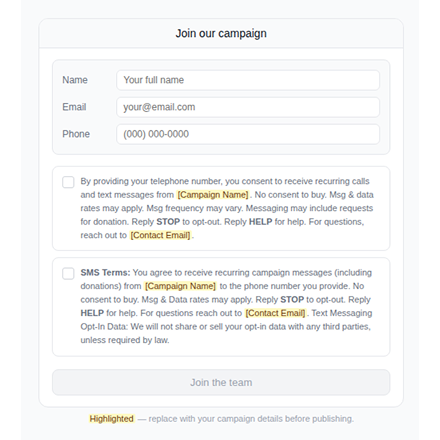
Step 2: Add a "Join Our Campaign" Section to Your Website
Carriers require documented opt-in consent from message recipients before high-volume political SMS can be sent. You must add a consent capture section and a specific Privacy Policy to your campaign website.
Required Opt-In Form Fields
• Name
• Phone number
Here is an example of a "Join Our Campaign" Section:
Required Consent Language (Opt-In Form)
Include the following consent disclaimer beneath the phone number field on your opt-in form, replacing bracketed placeholders with your campaign's details:
Required Privacy Policy
Your campaign website must also include a Privacy Policy page containing at minimum the following content, replacing bracketed placeholders with your campaign's details:
1. One Message, One Ask
Every text should have exactly one goal — ask voters to donate, RSVP, register to vote, or volunteer. Never bundle multiple asks into a single message. If you want a donation, ask only for the donation and include a direct link. A focused, specific ask consistently outperforms a general update.
3. Get the Length Right: SMS vs. MMS
Understanding character limits is essential to cost control and message delivery.
SMS (text only): The standard SMS limit is 160 characters, including spaces and punctuation. Messages longer than 160 characters may be split across multiple segments, increasing your cost. Keep SMS messages under 130 characters when possible to give room for your opt-out line. If you use emojis, they reduce your limit from 160 to 70 characters, use them sparingly.
Quick SMS formula:
MMS (with images, GIFs, or video): MMS allows up to 1,600 characters and supports rich media, but keep your message body under 320 characters. Use the extra allowance for your media, not lengthy copy. Longer messages cost more per send and are more likely to be delayed or filtered by carriers. Keep image files under 500KB and videos under 20 seconds.
| Format | Character Limit | Recommended Sweet Spot | Best Used For |
|---|---|---|---|
| SMS | 160 chars | Under 130 | Quick asks, donation nudges, GOTV reminders |
| MMS body | 1,600 chars | Under 320 | Event invites, fundraising with image, candidate intro |
3. Use MMS to Stand Out
MMS messages achieve up to 250% higher engagement rates compared to standard SMS. Use MMS for your highest-priority sends, fundraising appeals with a campaign photo, event invitations with a flyer, or a short video message from the candidate.
4. Timing Is Everything
Send texts when voters are most likely to engage, late morning to early evening on weekdays. Never send before 8:00 AM or after 9:00 PM in the recipient's local time zone. This is a best practice. Plan your messaging calendar around campaign milestones: early voting opens, registration deadlines, debate nights, fundraising deadlines, and Election Day.
5. Do Not Over-Text
Voters who hear from you too often will opt out or ignore your messages entirely. A clean, engaged list of opted-in supporters is far more valuable than a large, disengaged one. As a general rule, send no more than 2–4 texts per month during the regular campaign cycle. Increase frequency only in the final week before an election (GOTV push) or during a time-sensitive fundraising deadline.
6. Fundraising: Make It Effortless
Include a single direct link to your donation page in every fundraising text. Avoid multi-step forms, voters who have to click more than once are less likely to complete a donation.
7. Identify Your Campaign Clearly
Always include your campaign name in every text. Voters receive many texts and will ignore or block messages from unrecognized sources.
8. GOTV Texts — Your Biggest Opportunity
Get Out To Vote (GOTV) texts sent on and around Election Day are among the most impactful uses of SMS in any campaign. Research shows that text message reminders increase voter turnout by an average of 9.3%. Send election-day reminders that include the voter's polling location, voting hours, and a direct link to verify their registration. In close races, this alone can determine the outcome.
9. Always Include Opt-Out
Every text message must include a clear opt-out instruction such as "Reply STOP to unsubscribe." This is a legal requirement under TCPA and must be honored immediately — remove opted-out contacts from your list before the next send. Do not attempt to re-add contacts who have opted out. Honoring opt-outs promptly protects your campaign from legal liability and keeps your list healthy.
Email Services
Email Services
ElectHQ's Email Services enable campaigns to send targeted email communications to voters, donors, and volunteers directly from the platform. Email Services are available on a pay-as-you-go basis.
Email Warm-Up: Tips & Guidance Before Mass Sending
Your sender reputation is like a credit score, it needs to be built gradually before you send at scale. Follow these four key tips to ensure your emails land in the inbox, not the spam folder.
Tip 1: Start Slow and Ramp Up Gradually
Start with just 5–10 emails per day to keep off the spam radar and signal legitimate activity. Never increase your volume by more than 20% in a single day, even when engagement is strong. A sudden spike in sending volume is one of the fastest ways to trigger spam filters, regardless of how good your content is.
Tip 2: Follow a Weekly Warm-Up Schedule
In weeks 1–2, focus on internal team communications and existing contacts, people who are likely to open and respond. A domain is typically warmed up after 4 weeks, though complex campaigns may need 8–12 weeks for optimal deliverability. Patience in this phase protects your long-term sender reputation.
Tip 3: Maintain Consistent Sending Patterns
Email providers analyze when and how frequently you send. Establish consistent sending times and stick to them throughout your warm-up period. Sporadic or unpredictable sending patterns confuse providers and slow down reputation building, consistency signals that you are a trustworthy, legitimate sender.
Tip 4: Vary Your Content
Avoid using identical templates. Vary your subject lines, email length, and content structure to appear more human-like to spam filters. Generic, templated content reduces engagement signals and can hurt your reputation, craft each email to feel personal and relevant to its recipient.
Email Campaign Template
Customize your layout, imagery, and content to match your campaign brand.
Audience Management
Segment your email lists by voter group, donor tier, volunteer status, or custom tags. Send targeted messages to the right audience at the right time to maximize engagement and response rates.
Compliance
All email communications sent through ElectHQ must comply with the CAN-SPAM Act and applicable state and international email marketing laws. ElectHQ automatically includes an unsubscribe link in every outbound email.
Deliverability
ElectHQ monitors email deliverability and sender reputation on your behalf. To maintain high deliverability rates, ensure your email content avoids spam triggers, keep your contact lists clean and up to date, and review bounce and unsubscribe reports regularly from your dashboard.
Account Deletion
Account Deletion
You may request permanent deletion of your ElectHQ account and associated campaign data. We verify your identity before processing any deletion request to protect you and your committee from unauthorized removal.
How to request deletion
Use the dedicated web form: Account Deletion request. Enter the full name and email address registered on your account, complete email verification with the one-time code we send you, confirm that you understand deletion is permanent, then submit the request.
What happens next
After we verify your request, your account will be scheduled for permanent deletion. Deletion is typically completed within fifteen (15) days. This timeline may vary where retention is required by law or to resolve disputes. Once processed, data cannot be recovered.
Note:
Deleting your account does not automatically cancel any third-party obligations (for example, carrier fees already incurred). For billing questions, contact support@electhq.net.
Support & Contact
Support & Contact
If you need assistance with the ElectHQ platform, our support team is available to help.
Technical Support
For technical issues, submit a support ticket through your account dashboard or contact our team directly. Standard support is included with all paid subscriptions.